


06 Jan Facebook Business Manager Accounts Are at Risk: Hackers Are Using Fake Meta Blue Links
Facebook Business Manager Accounts are at Risk Hackers are using Fake Meta Blue links
Businesses Losing Their Facebook Pages Overnight
Business owners and marketing teams are facing a new threat: hackers are stealing Facebook Business Manager accounts through fake messages about “Meta Blue verification.” This is not a joke. Entire business accounts, including Pages and ad accounts, are disappearing in minutes.
If you manage Facebook for your business, you need to know what is happening—and how to protect yourself.
What Is Happening?
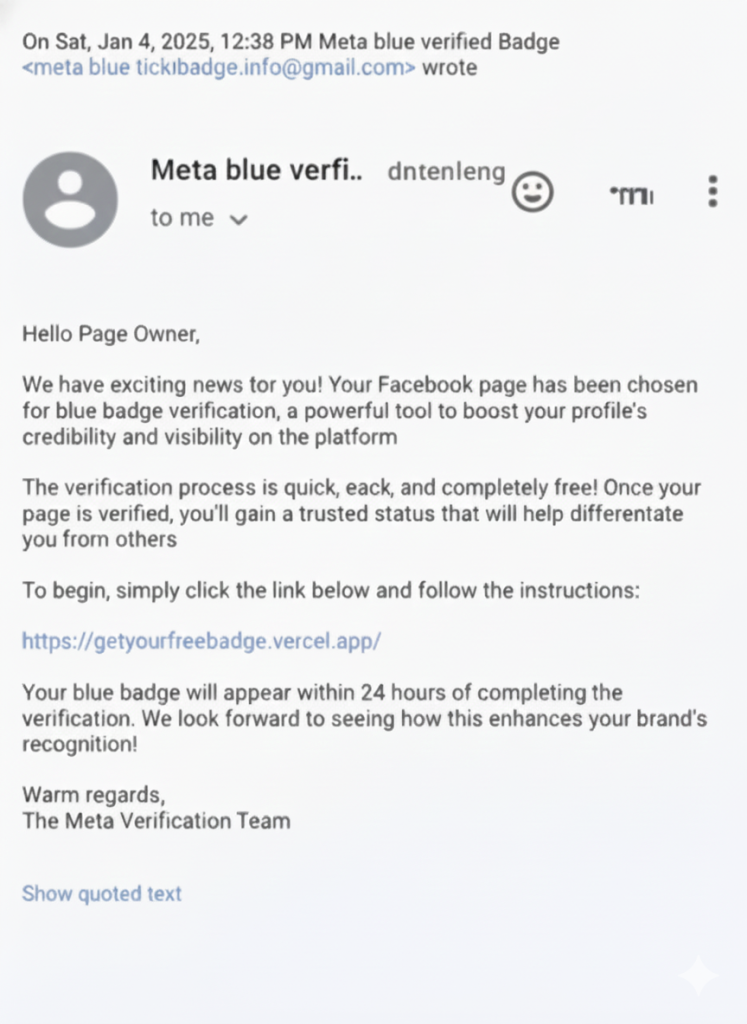
Hackers send messages that look like they are from Meta (Facebook).
These messages often say things like:
“Your Page is eligible for Meta Blue.”
“Your account must be verified immediately.”
“You risk losing access if you do not click here.”
The message includes a link. It looks real, but it is completely fake.
When someone clicks the link and enters their login details, hackers get full control of the Business Manager account.
How Hackers Steal Accounts
Once the fake link is clicked:
Hackers capture the login credentials. They remove the original admin from the Business Manager.
They take control of Pages, ad accounts, pixels, catalogs, and payment methods. Recovery becomes very difficult, sometimes impossible. This means businesses can lose:
- Pages they have spent years building
- Active ad campaigns
- Client trust and marketing data
- For agencies or companies managing multiple clients, the consequences can be financially devastating.
Why Business Managers Are Targeted
Business Manager accounts are highly valuable because they give access to:
- Multiple Facebook Pages
- Advertising budgets
- Client assets
- Payment methods
- Marketing data
One account hacked can destroy years of work and cost money and reputation. That is why hackers are focusing on Business Manager instead of personal Facebook accounts.
The Truth About Meta Blue Verification
Meta does NOT send links via Messenger or email asking you to verify your Business Manager.
All official Meta Blue verification happens inside Meta platforms only, such as:
- Business Settings
- Meta Business Suite
- Official Meta websites
Any message claiming urgent verification outside these platforms is a scam.
Protecting Your Business Manager
Here’s what businesses should do:
- Never click Meta Blue links from messages or emails.
- Enable two-factor authentication (2FA) for all admins.
- Limit admin access to only trusted staff.
- Use business emails for all accounts, not personal emails.
- Educate your team about phishing and scams.
Even one careless click can result in total loss of control.
What to Do If Your Account Is Hacked
If your Business Manager is already compromised:
1. Immediately report the account to Meta Business Help Center.
2. Change all passwords.
3. Remove payment methods if possible.
4. Inform your clients if their Pages or campaigns are affected.
Be aware: full recovery may not be possible. Prevention is far more effective than recovery.
Final Thoughts
Facebook Business Manager is no longer safe by default. Hackers are actively targeting businesses through fake Meta Blue verification messages.
One wrong click can:
1. Delete your Pages
2. Stop ad campaigns
3. Ruin client trust
Business owners and marketing teams must be alert, train their teams, and never trust Meta Blue messages outside official Meta platforms.
Sources
Meta Phishing Awareness
https://www.facebook.com/business/help/181066437218547
Meta Business Help Center – Account Security
https://www.facebook.com/business/help
Meta Official Verification Information
https://www.facebook.com/help/828951930774870